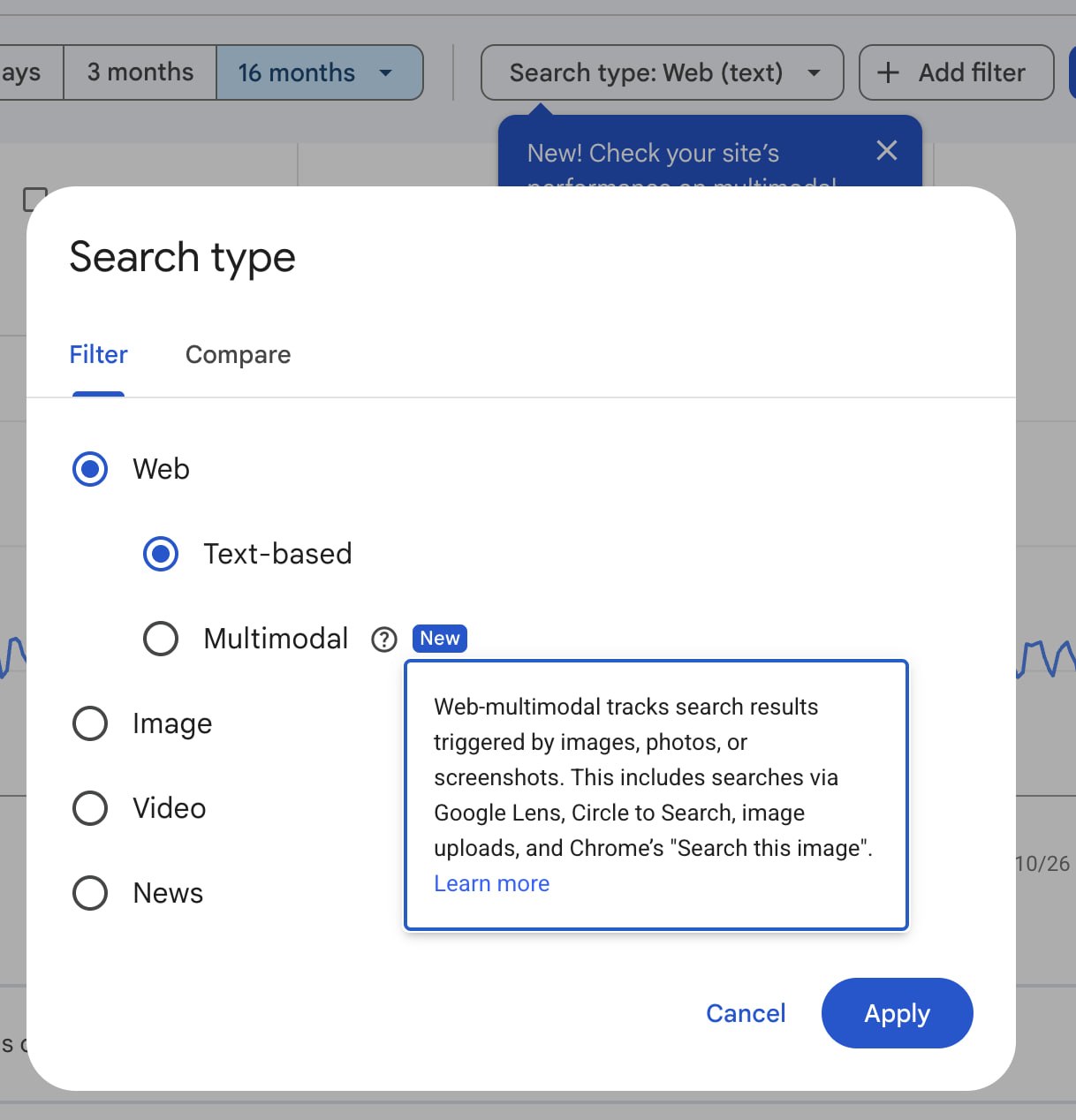
You can use the Multimodal filter in Google Search Console to measure searches that start with an image. A person can use a photo or screenshot to find your page without typing a search term.
Google includes this traffic under the Web search type in the Search results report. You can select Multimodal to review it separately from searches that start with text.
Which searches count as Multimodal
Google includes searches from these tools:
- A person uses Google Lens to search with an image or camera photo.
- A person selects part of the screen with Circle to Search.
- A person uploads an image to Google Search.
- A person uses Chrome's "Search this image" option.
E.g., a shopper can photograph a lamp and use Google Lens to find a page that sells it. If your page appears in the results, you can get a Multimodal impression. If the shopper selects your link, you can get a click.
How Multimodal differs from Image search
In Google's search type definitions, Web has two options. With "Text-based", you measure searches that start with words in the search bar. With "Multimodal", you measure searches that start with images.
The separate "Image" option is for results in the Google Images tab. Select Multimodal when you want to check traffic from Google Lens. Select Image when you want to check traffic from Google Images results.
How to open the Multimodal report
- Open Search Console and select your website property.
- Open "Performance", then "Search results" if your menu has that option.
- Select the "Search type" filter above the chart.
- Under "Web", select "Multimodal".
- Select "Apply".
- Choose a date range with complete data.
- Open the "Pages" tab below the chart.
Check for filters left from an earlier review. Remove them if you want results for the whole site.
Start with pages because queries are unavailable
You cannot use the Queries tab for Multimodal searches. Google states that text query data is unavailable for this search type, because people mainly search with images.
Start with the Pages tab to find the pages that get clicks. Then check impressions to find pages that appear in results but get few clicks. You can also review countries and devices to see where people search.
Select one page that is useful to your business. Open the page itself and check whether the main photo clearly shows its subject. Read the nearby text to check whether a visitor can identify the item.
Keep your conclusions at the page level. Without query data, you cannot identify the exact search term that led to a visit.
Compare Multimodal results over time
Start with 28 complete days and compare them with the previous 28 days. Keep Multimodal selected for both periods. In the date filter, select "Compare" and set the two periods. Google explains these controls in its comparison instructions.
Use the same page and country filters for both periods. Check clicks and impressions together. If clicks increased, check whether the increase occurred across several pages or mainly on one page.
Record the numbers as well as the percentage change. An increase from two clicks to four clicks is 100%, but it is only two additional clicks. Do not plan a large content change from that result alone.
If you also review text searches, save their results separately and label each report with its search type. You need the label when you compare the figures later.
Check the images on pages that get traffic
Use Google's image guidance to review a page that gets Multimodal impressions. Google recommends clear images and relevant text near each image.
Check these items before you replace an image:
- Use a sharp image that shows the subject clearly.
- Put the image near text that describes the same subject.
- Give the image a short, descriptive filename.
- Write useful alt text, which describes the image for people who cannot see it.
- Check that the page loads quickly on a phone.
For the lamp page, you could use a clear product photo beside the product name and dimensions. Write alt text that describes the lamp in that photo. Do not add a list of search terms.
Record the date if you change the page. Compare results after you have enough complete data for another equal period. A traffic change alone does not prove that the image edit caused it.
Can you get Multimodal data through the API?
As of October 1, 2026, Google's Search Analytics API reference does not document a separate Multimodal search type. The documented web value does not provide a Multimodal selection.
Use the filter in Search Console for this analysis. Do not label a standard Web result from SearchConsole.ai as Multimodal data. For help with the other report controls, read our Performance report guide.