Your page can appear in Google for search terms that you did not plan to target. Google Search Console (GSC) shows many of these terms. It calls them queries.
Use these queries to find information that your page needs. Then make one change that helps the reader.
Why use this method?
This method helps you:
- Select content changes from your own search data.
- Improve an existing page before you write a new article.
- Add answers that match what people search for.
Allow 2–5 minutes for the first check. A content change can take longer. Adding a keyword alone does not guarantee more traffic.
Step 1: Open the search performance report
- Open GSC and select your website.
- Open Performance, or Performance → Search results.
- Select 3 months and Search type: Web.
- Enable Total clicks, Total impressions, and Average position.
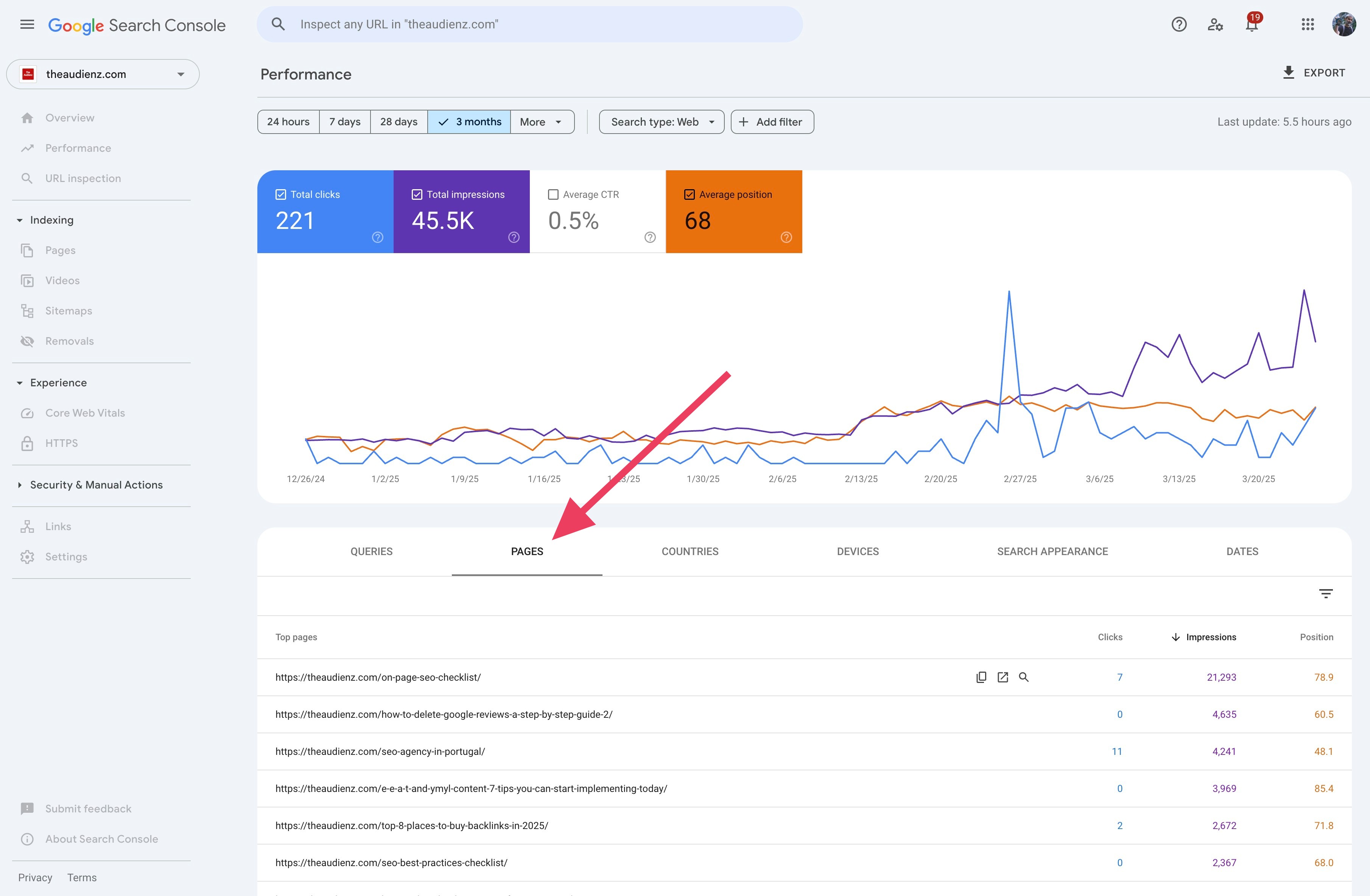
- Click Pages below the chart.
Step 2: Select a page to improve
Click Impressions to put the largest values first. Impressions show how often a page appeared in search results.
Choose a page that is important to your readers or business. Click its URL to show data for that page.
Example: The /on-page-seo-checklist/ page has 21,293 impressions, 7 clicks, and an average position of 78.9. It has the most impressions in the visible table. Start here to check which queries need a closer review.
Step 3: Find a query the page can answer better
Click Queries. Sort Position to put the smallest values first.
A smaller number means a higher average position. It is not a fixed rank. See Google's explanation of search performance metrics.
Select a query that matches the page's purpose. Check its impressions and clicks. Give priority to a useful answer that the page does not yet provide.
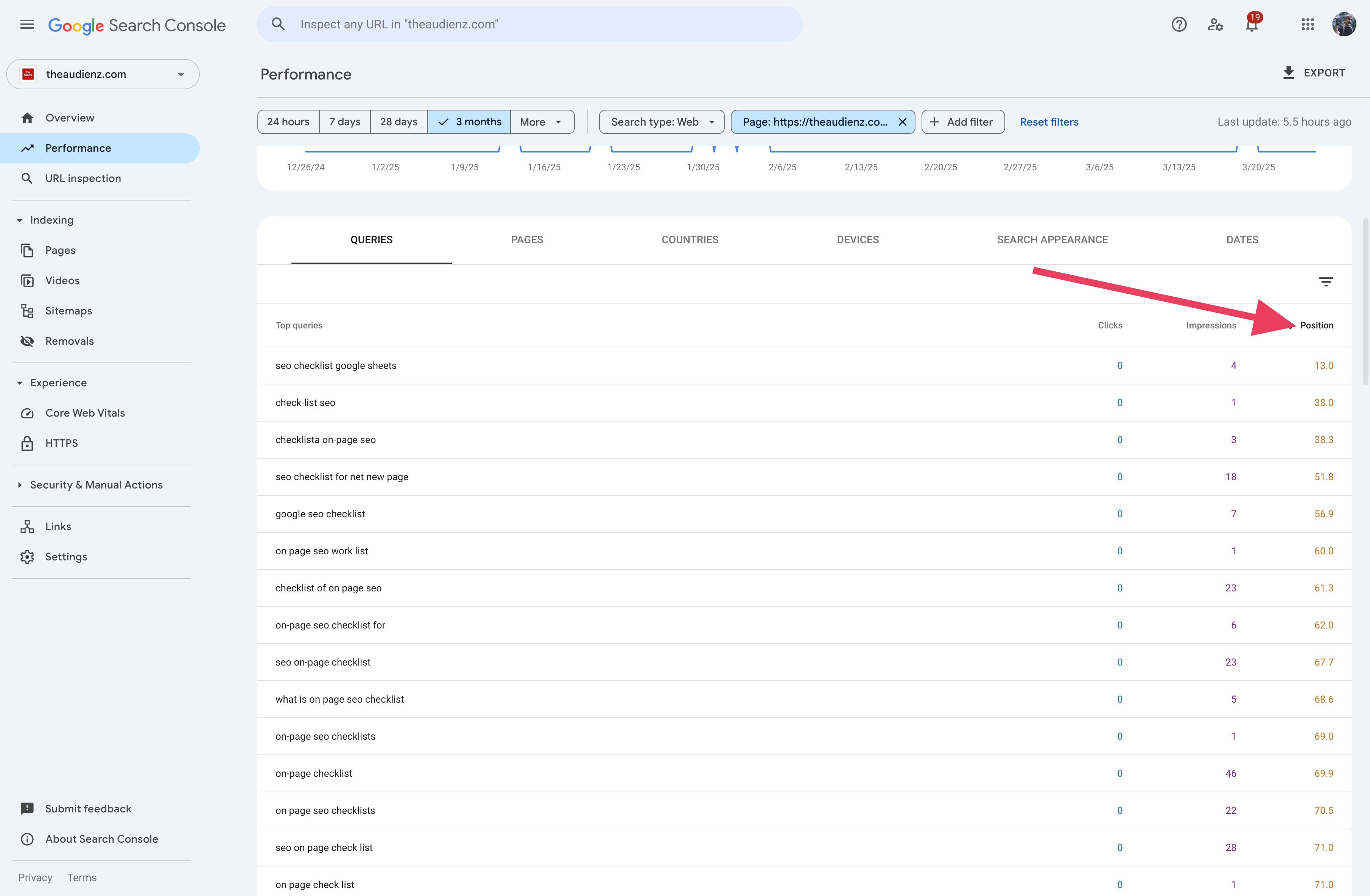
These three queries appear in the screenshot:
| Query | Clicks | Impressions | Average position |
|---|---|---|---|
| seo checklist google sheets | 0 | 4 | 13.0 |
| seo checklist for net new page | 0 | 18 | 51.8 |
| on page seo work list | 0 | 1 | 60.0 |
The Google Sheets query has the best position of these three. The new-page query has more impressions. Check both before you choose an edit. These small counts do not show strong demand.
Step 4: Add useful information to the page
Read the page before you edit it. Check whether it already answers the query with different words.
If information is missing, add a short explanation, an example, or a useful resource. Use the query's words where they help the reader.
Use the screenshot queries to check for these possible improvements:
- “seo checklist google sheets”: If your page provides a template, add the heading Download the SEO checklist for Google Sheets. Put the template link below it.
- “seo checklist for net new page”: Check whether the page explains what to do before publication. If this information is missing, add SEO checks before you publish a new page. List the checks in the order the reader must complete them.
- “on page seo work list”: This query may refer to a task list. If your page needs one, add a short list with one action per item. One impression does not justify a separate page.
These are suggested edits. The screenshots do not show the page content. Confirm that each addition is useful before you make it.
Step 5: Record the change and check the results
Save the page URL, query, edit, and date. Review the results after a few weeks. Google explains that search results take time to reflect content changes.
Compare equal periods before and after the change. Keep the same page, query, and search type filters. Check clicks, impressions, and average position.
These results help you choose the next edit. They do not prove that your change caused a traffic increase or decrease.
Recipe: Find a content improvement with SearchConsole.ai
Connect SearchConsole.ai to your AI assistant. Use this recipe:
Use SearchConsole.ai for [my property]. Check the last 90 complete days of Web search data. Show the dates. Select one page with many impressions and get its queries. Show clicks, impressions, and average position. Read the page before you suggest a change. If you cannot read it, ask me for the text. Find one relevant query that the page could answer better. Check whether the page already answers it with different words. Suggest one useful edit and show where to add it. Flag evidence based on few impressions. Give me a simple plan to compare the results after the change.
By Flavio Amiel